امروز ما مشتاق معرفی Next.js 9.5 هستیم که شامل موارد زیر است:
Next.js روش های تولید سایت ایستا را در نسخه 9.3 با یک هدف روشن معرفی کرد: ما باید از مزایای استاتیک (همیشه سریع، همیشه آنلاین، تکراری جهانی) استفاده کنیم، اما با پشتیبانی عالی از داده های پویا که Next.js به آن معروف است.
برای به دست آوردن بهترین هر دو دنیا، Next.js را معرفی کردیم تولید استاتیک افزایشی، به روز رسانی محتوای ثابت پس از اینکه قبلاً سایت خود را ساخته اید. با کمک fallback: true گزینه ج getStaticPaths، شما می توانید رجیستری صفحات استاتیک جدید در زمان اجرا.
Next.js می تواند به صورت ایستا تعداد بی نهایت صفحه را به این صورت پیش رندر کند، بدون توجه به اینکه مجموعه داده شما چقدر بزرگ است.
امروز اعلام می کنیم کل موجودی در بازسازی استاتیکی افزایشی، که یک مکانیسم است برای به روز رسانی موجود صفحات، با رسیدن ترافیک آنها را در پس زمینه رندر می کند.
بازسازی پسزمینه با الهام از احیای پسزمینه تضمین میکند که ترافیک بهطور مداوم، همیشه از فضای ذخیرهسازی استاتیک ارائه میشود، و صفحه جدید ساخته شده فقط ارسال میشود. پس از اتمام تولید.
export async function getStaticProps() {
  return {
    props: await getDataFromCMS(),
    // we will attempt to re-generate the page:
    // - when a request comes in
    // - at most once every second
    revalidate: 1,
  };
}
پرچم اعتبار مجدد تعداد ثانیه هایی است که حداکثر یک نسل برای جلوگیری از https://en.wikipedia.org/wiki/Cache_stampede رخ می دهد.
بر خلاف SSR سنتی، بازسازی تدریجی استاتیک تضمین می کند که مزایای استاتیک را حفظ کنید:
- بدون جهش در تاخیر. صفحات به طور مداوم سریع ارائه می شوند.
- صفحات هرگز آفلاین نمی شوند. اگر بازسازی صفحه پسزمینه با شکست مواجه شود، صفحه قدیمی بدون تغییر باقی میماند.
- پایگاه داده کم و بارگذاری باطن. صفحات حداکثر یکبار “به یکباره” دوباره محاسبه می شوند.
هر دو ویژگی اضافی (افزودن صفحات و به روز رسانی آنها) و همچنین حالت پیش نمایش اکنون پایدار هستند و اکنون به طور کامل توسط هر دو پشتیبانی می شود. next start و پلت فرم لبه Vercel خارج از جعبه.
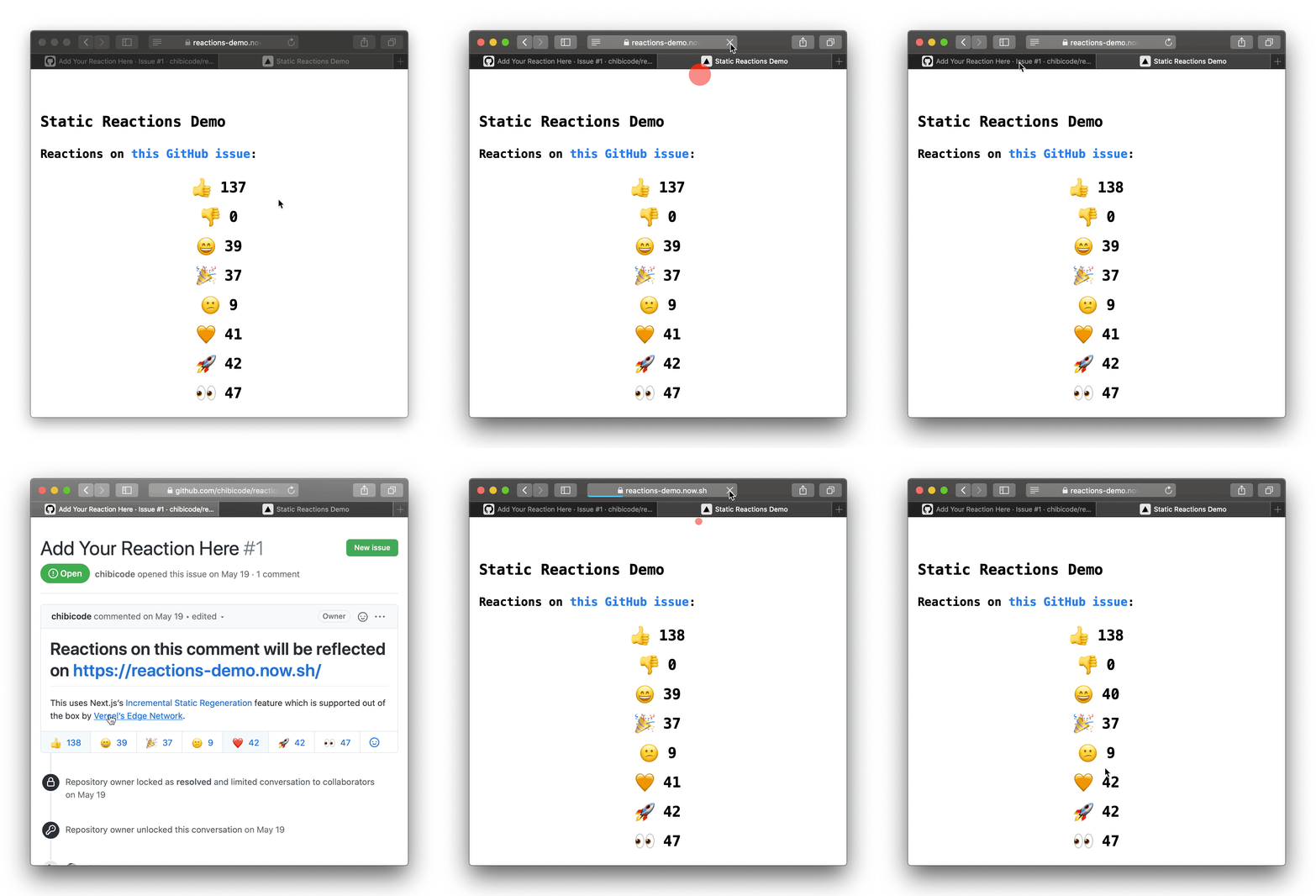
برای نشان دادن این ویژگی جدید، نمونهای ایجاد کردیم که بازسازی یک صفحه ثابت را نشان میدهد که تعداد واکنشهای مختلف را در GitHub برای یک مشکل خاص نشان میدهد: https://reactions-demo.vercel.app/
سپس روی یک RFC اضافی کار خواهیم کرد تا دو قابلیت اضافی برای تولید استاتیک افزایشی را بررسی کنیم:
- چندین صفحه را به طور همزمان ایجاد و باطل کنید (مانند فهرست وبلاگ شما و یک پست وبلاگ خاص)
- بازسازی با گوش دادن به رویدادها (مانند وب هوک های CMS) قبل از ترافیک کاربر
برای جزئیات بیشتر مراجعه کنید getStaticProps مستندات
پروژه های Next.js همیشه توسط دامنه اصلی ارائه نمی شوند. گاهی اوقات ممکن است بخواهید پروژه Next.js خود را تحت یک مسیر فرعی مانند میزبانی کنید /docs به طوری که پروژه Next.js فقط آن زیربخش از دامنه را پوشش می دهد.
در حالی که این امر تا کنون امکان پذیر بود، اما به قیمت کمی پیکربندی اضافی تمام شد. به عنوان مثال اضافه کردن یک پیشوند به هر یک و مطمئن شوید که Next.js بسته های جاوا اسکریپت را از مسیر صحیح ارائه می دهد.
برای رفع این مشکل، یک گزینه پیکربندی جدید را معرفی می کنیم. basePath به شما امکان می دهد پروژه Next.js خود را به راحتی در مسیر فرعی دامنه خود میزبانی کنید.
برای شروع استفاده basePath می توانید آن را به آن اضافه کنید next.config.js:
module.exports = {
  basePath: '/docs',
};
پس از پیکربندی basePath پروژه شما به طور خودکار از مسیر ارائه شده هدایت می شود. در این مورد /docs.
هنگام پیوند دادن به صفحات دیگر در پروژه با next/link یا next/router در basePath به طور خودکار پیشوند خواهد شد. این به شما امکان تغییر می دهد basePath بدون تغییر پروژه
یک مثال از این می تواند استفاده باشد next/link برای تغییر مسیر به صفحه دیگر:
import Link from 'next/link';

export default function HomePage() {
  return (

      Link href="/documentation-page">
        a>Documentation pagea>
      Link>
    >
  );
}
استفاده next/link انجام این کار باعث می شود HTML زیر در مرورگر وب ارائه شود:
a href="/docs/documentation-page">Documentation pagea>برای جزئیات بیشتر مراجعه کنید basePath مستندات
لینک را به عنوان کپی کنیدپشتیبانی از بازنویسی، تغییر مسیر و هدر
لینک را به عنوان کپی کنیدبازنویسی می کند
هنگام ایجاد یک پروژه Next.js، ممکن است بخواهید مسیرهای خاصی را به URL دیگری پروکسی کنید. برای مثال، اگر میخواهید به تدریج Next.js را در پشته خود بپذیرید، میخواهید صفحاتی را که در پروژه Next.js شما وجود دارد و سپس هر چیزی که به پروژه قدیمی که از آن مهاجرت میکنید نگاشت نشده است را مسیریابی کنید.
با Next.js 9.5، یک گزینه پیکربندی جدید به نام معرفی می کنیم rewritesکه به شما امکان می دهد یک مسیر درخواست ورودی را به یک مسیر مقصد دیگر، از جمله URL های خارجی، نگاشت کنید.
برای مثال، ممکن است بخواهید یک مسیر خاص را بازنویسی کنید example.com:
module.exports = {
  async rewrites() {
    return [
      { source: '/backend/:path*', destination: 'https://example.com/:path*' },
    ];
  },
};
در این مورد، تمام مسیرهای زیر /backend هدایت خواهد شد example.com.
همچنین میتوانید بررسی کنید که آیا مسیرهای پروژه Next.js مطابقت دارند یا خیر و سپس در صورت عدم وجود مطابقت، آن را به پروژه قبلی بازنویسی کنید. این فوق العاده مفید است پذیرش تدریجی Next.js:
module.exports = {
  async rewrites() {
    return [
      // check if Next.js project routes match before we attempt proxying
      {
        source: '/:path*',
        destination: '/:path*',
      },
      {
        source: '/:path*',
        destination: `https://example.com/:path*`,
      },
    ];
  },
};
در این حالت ابتدا همه مسیرها را به هم وصل می کنیم. اگر هیچ کدام مطابقت نداشت، ما پروکسی می کنیم example.com که پروژه قبلی خواهد بود.
برای کسب اطلاعات بیشتر در مورد rewrites عملکرد، اسناد بازنویسی را بررسی کنید.
لینک را به عنوان کپی کنیدتغییر مسیرها
اکثر وب سایت ها حداقل به برخی تغییر مسیرها نیاز دارند. به خصوص زمانی که ساختار مسیرهای پروژه خود را تغییر می دهید. به عنوان مثال هنگام حرکت /blog به /news یا انتقال های مشابه
پیش از این، داشتن لیستی از تغییر مسیرها در پروژه Next.js نیاز به راه اندازی یک سرور سفارشی یا سفارشی داشت. _error برای بررسی اینکه آیا تغییر مسیر برای مسیر تنظیم شده است یا خیر. با این حال، این به قیمت از بین بردن بهینهسازیهای استاتیک و بدون سرور کلید (با داشتن سرور) یا به اندازه کافی ارگونومیک نبود.
با شروع با Next.js 9.5، اکنون می توانید لیستی از تغییر مسیرها را در آن ایجاد کنید next.config.js زیر redirects کلید:
module.exports = {
  async redirects() {
    return [
      {
        source: '/about',
        destination: '/',
        permanent: true,
      },
    ];
  },
};
برای کسب اطلاعات بیشتر در مورد redirects تابع مستندات تغییر مسیرها را ببینید.
Next.js به شما امکان میدهد پروژههای ترکیبی ایجاد کنید که از تولید استاتیک و رندر سمت سرور استفاده میکنند. با رندر سمت سرور، می توانید هدرهایی را برای درخواست ورودی تنظیم کنید. برای صفحات استاتیک، تنظیم هدر تا کنون امکان پذیر نبود.
اکنون الف را معرفی کرده ایم headers ملک در next.config.js که برای همه مسیرهای Next.js اعمال می شود:
module.exports = {
  async headers() {
    return [
      {
        source: '/:path*',
        headers: [
          {
            key: 'Feature-Policy',
            // Disable microphone and geolocation
            value: "microphone 'none'; geolocation 'none'",
          },
        ],
      },
    ];
  },
};
را headers این گزینه به شما امکان می دهد هدرهایی را که معمولاً مورد نیاز هستند را تنظیم کنید Feature-Policy و Content-Security-Policy.
برای کسب اطلاعات بیشتر در مورد headers تابع مستندات سرصفحه ها را ببینید.
وقتی Next.js 3 سال پیش معرفی شد، رفتار پیشفرض آن این بود که همه URLهای دارای اسلش انتهایی همیشه یک صفحه 404 را برمیگردانند.
اگرچه موثر است، اما برخی از کاربران امکان تغییر این رفتار را درخواست کرده اند. به عنوان مثال، هنگام انتقال یک پروژه موجود به Next.js که قبلاً همیشه دارای اسلش های انتهایی بود.
با Next.js 9.5 گزینه جدیدی به نام معرفی کردیم trailingSlash به next.config.js.
این گزینه جدید تضمین می کند که Next.js به طور خودکار رفتار اسلش انتهایی را کنترل می کند:
- به طور خودکار URL های دارای اسلش های انتهایی به URL ها بدون اسلش های انتهایی هدایت شوند، به عنوان مثال:
/about/به/about - چه زمانی
trailingSlashتنظیم شده استtrueURL بدون اسلش انتهایی به URL با اسلش انتهایی هدایت می شود، به عنوان مثال:/aboutبه/about/ - فراهم می کند
next/linkبه طور خودکار اعمال/حذف اسلش انتهایی برای جلوگیری از تغییر مسیرهای غیر ضروری.
module.exports = {
  // Force a trailing slash, the default value is no trailing slash (false)
  trailingSlash: true,
};
برای کسب اطلاعات بیشتر در مورد trailingSlash تابع مستندات trailingSlash را ببینید
هنگامی که صفحات Next.js را می نویسید، ایجاد تمام بسته های اسکریپت، شیوه نامه های CSS و HTML کاملاً خودکار و از شما انتزاع می شود. اگر تولید شده را بررسی کنید tags before Next.js 9.5, you’ll notice their URLs follow a pattern like this:
/_next/static/ovgxWYrvKyjnlM15qtz7h/pages/about.jsovgxWYrvKyjnlM15qtz7h above is what we called the build ID. While these files were easily cacheable at the edge and on the user’s machine, after re-building your app, the build ID would change and all caches would be busted.
For most projects this trade-off was fine, however, we wanted to optimize this behavior even further by no longer invalidating the browser cache for pages that had not been changed.
The introduction of the improved code-splitting strategy in Next.js 9.2 that was developed in collaboration with the Google Chrome team laid some groundwork for these improvements to the Next.js page bundle generation.
Starting with Next.js 9.5 all page JavaScript bundles will use content hashes instead of the build ID. This allows for pages that have not changed between deploys to remain in the browser and edge cache without needing to be downloaded again.
In contrast, the URL pattern after these changes looks something like:
/_next/static/chunks/pages/about.qzfS4o5gIEXRME6sTEahL.jsqzfS4o5gIEXRME6sTEahL portion is a deterministic hash of the about.js bundle, which will be stable insomuch the code for that section of your site doesn’t change. Further, it’s now cached long-term across re-deploys via
Cache-Control: public,max-age=31536000,immutable which Next.js automatically sets for you.
We introduced Fast Refresh in Next.js 9.4, a new hot reloading experience that gives you instantaneous feedback on edits made to your React components.
Next.js 9.5 further refines our Fast Refresh implementation and gives you the tools you need to succeed:
- Easy to understand errors: All compile and runtime errors were updated to only show relevant information, including a code frame of whatever code caused the error.
- Development-time tips to keep component state: Next.js now provides you with helpful tips to ensure Fast Refresh will keep your component state in as many scenarios as possible. Each tip Next.js provides is fully actionable and accompanied by a before and after example!
- Warnings when component state is reset: We’ll now print a detailed warning when Next.js is unable to keep component state after a file is edited. This warning will help you diagnose why the project had to reset component state, allowing you to fix it and utilize Fast Refresh to its full potential.
- New documentation: We’ve added extensive documentation that explains what Fast Refresh is, how it works, and what to expect! The documentation will also teach you how to better leverage Fast Refresh by explaining how its error recovery works.
- User-code troubleshooting guide: The new documentation also includes common troubleshooting steps and tips on how to get the most out of Fast Refresh in development.
--profile flag in next build:
After that, you can use the profiler in the same way as you would in development.
To learn more about profiling React you can read the post on the React Profiler by the React team. Special thanks to TODOrTotev and @darshkpatel for contributing this feature.
Next.js 9.2 added support for catch-all dynamic routes which have been widely adopted by the community for various use cases. Catch-all routes give you the flexibility to create highly dynamic routing structures powered by Headless CMS, GraphQL APIs, filesystem, etc.
In listening to feedback, we heard users wanted to have even more flexibility to match the root-most level of a route. Today, we’re happy to unveil optional catch-all dynamic routes for these advanced scenarios.
To create an optional catch-all route, you can create a page using the [[...slug]] syntax.
For example, pages/blog/[[...slug]].js will match /blog, as well as any route underneath it, such as: /blog/a, /blog/a/b/c, and so on.
Like catch-all routes, slug will be provided in the router query object
as an array of path parts. So, for the path /blog/foo/bar, the query object will be { slug: ['foo', 'bar'] }. For the path /blog, the query object will omit the slug key: { }.
You can learn more about optional catch all routes in our documentation.
Webpack 5 is currently in beta. It includes some major improvements:
We’re excited today to announce the beta availability of webpack 5 for Next.js.
To try out webpack 5 you can use Yarn resolutions in your package.json:
{
  "resolutions": {
    "webpack": "^5.0.0-beta.30"
  }
}Copy link to headingCompilation infrastructure improvements
To support webpack 5 we have rewritten a lot of the compilation pipeline to be more tailored to Next.js:- Next.js no longer relies on
webpack-hot-middlewareandwebpack-dev-middleware, instead we now use webpack directly and optimize specifically for Next.js projects. This translates into a simpler architecture and faster development compilation. - On-demand-entries, which is the system Next.js has to allow it to compile on the pages that you visit at a given time during development, has also been rewritten and is now even more reliable by leveraging new webpack behavior specifically tailored for our use case.
- React Fast Refresh and the Next.js Error Overlay are now fully compatible with webpack 5
- Disk caching will be enabled in a future beta release.
Copy link to headingBackwards compatibility
We are always committed to ensuring that Next.js is backwards compatible with previous versions. Webpack 4 will continue to be fully supported. We are working closely with the webpack team to ensure the migration from webpack 4 to 5 is as smooth as possible. If your Next.js project has no custom webpack configuration, no project changes will be needed to fully leverage webpack 5. Important: if your project has custom webpack configuration, some changes might be needed to transition to webpack 5. We recommend keeping an eye out for our migration instructions or minimize your usage of webpack extensions altogether for seamless future upgrades.Copy link to headingImproved file watching on macOS
We recently found an issue with webpack where file watching on macOS would stop after making a few changes to your code. You’d have to restart your project manually to see updates again. After a few changes, the cycle would repeat. Furthermore, we found that this issue didn’t just happen in Next.js projects but all projects and frameworks that build on top of webpack. After several days of debugging the issue, we tracked down its root cause to the file watching implementation that webpack uses called chokidar, which is a file watching implementation widely used in the Node.js ecosystem. We sent a patch to chokidar to fix the issue. After the patch was released we worked with Tobias Koppers to roll out this patch in a new webpack version. This patched webpack version is automatically used when you upgrade to Next.js 9.5. We’re excited to see the continued growth in Next.js adoption:- We have had over 1,200 independent contributors**,** with over 135 new contributors since the 9.4 release.
- On GitHub, the project has been starred over 51,100 times.
Copy link to headingCredits
We are thankful to our community, including all the external feedback and contributions that helped shape this release. Special thanks to Jan Potoms, a long-time Next.js community member who contributed to multiple features in this release. Special thanks to Tobias Koppers, the author of webpack, who helped land webpack 5 support in Next.js. This release was brought to you by the contributions of: @chandan-reddy-k, @Timer, @aralroca, @artemisart, @sospedra, @prateekbh, @Prioe, @Janpot, @merceyz, @ijjk, @PavelK27, @marbiano, @MichelleLucero, @thorsten-stripe, @TODOrTotev, @Skn0tt, @lfades, @timneutkens, @akhila-ariyachandra, @chibicode, @rafaelalmeidatk, @kirill-konshin, @jamesvidler, @JeffersonBledsoe, @tylev, @jamesmosier, @filipemarins, @Remeic, @vvo, @timothyis, @jazibsawar, @coetry, @adam-zacharski, @danwilliams, @tywmick, @matamatanot, @goldins, @mvllow, @its-tayo, @sshyam-gupta, @wilbert-abreu, @sebastianbenz, @jaydenseric, @developit, @dylanjha, @darshkpatel, @spinks, @stefanprobst, @moh12594, @jasonmerino, @cristiand391, @HyunSangHan, @mcsdevv, @M1ck0, @hydRAnger, @alexej-d, @valmassoi, @motleydev, @eKhattak, @jpedroschmitz, @JerryGoyal, @bowen31337, @phillip055, @balazsorban44, @chuabingquan, @youhosi, @andresz1, @bell-steven, @areai51, @Wssn, @ndom91, @anthonyshort, @zxzl, @jbowes, @IamLizu, @PascalPixel, @ralphilius, @ysun62, @muslax, @elsigh, @AsherFoster, @botv, @tomdohnal, @christianalfoni, @tomasztunik, @gsimone, @illuminist, @jplew, @OskarKaminski, @RickyAbell, @steph-query, @ericgoe, @MalvinJay, @cristianbote, @Ashikpaul, @jensmeindertsma, @amorriscode, @abhik-b, @awareness481, @LukasPolak, @arvigeus, @romMidnight, @jackyef, @drumm2k, @kuldeepkeshwar, @bogy0, @Belco90, @wawjr3d, @tanmaylaud, @SarKurd, @kevinsproles, @dstotijn, @styfle, @blackwright, @BrunoBernardino, @heyAyushh, @Necmttn, @TrySound, @obedparla, @NyashaNziramasanga, @tonyspiro, @kukicado, @ceorourke, @MehediH, @robintom, @karlhorky, and @tcK1!Source link